

iReserves with KIC For Faculty and Students

Permanent Legal Distribution of Highly Organized, Hyperlinked and Annotated Digital Compendia of Reserves and Open Access Content
How Students Benefit from Course Mind Palaces with Instant Navigation
Large flatscreen displays in classrooms are very useful, but they are quite underutilized. These displays can be windows to large amounts of relevant, useful library-owned content, with instant navigation between hundreds, even thousands of individual instructional pages. Until recently, many challenges have deterred educational software technologists from solving this problem, with copyright restrictions at the top of the list.
Fortunately, as the supplier of 90% of copyright limitations laws technologies to US Academic libraries, DLSG knew that combining ILL and self-serve digitization copyright limitations laws with its Mind Palaces was the answer. ILL allows instructors to create the best possible sets of course materials and navigate between them effortlessly in class. Instructors can easily create Course Mind Palaces combining course textbooks with supplemental materials, group and re-sequence the content as desired, and instantly navigate to and display any of the content for all students to view.
Instructors can share the Course Mind Palaces, allowing their students to navigate instantly and easily through the digital content after scanning it with a KIC or while in the library, inside an iFence. In addition, students can add their own navigable highlights and text and audio notes, and use great study tools such as Readalong Audio, computer-assisted speed reading (no training required), making and using custom flashcards, and benefitting from a 24/7 study coach.
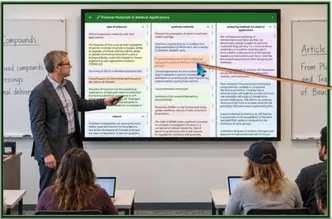
With iReserves and Course Mind Palaces, instructors are typically two clicks away from any and all course materials at all times. Even materials from more advanced courses can be instantly displayed to make a connection between current course concepts and concepts that will be covered in subsequent courses in the same field of study.
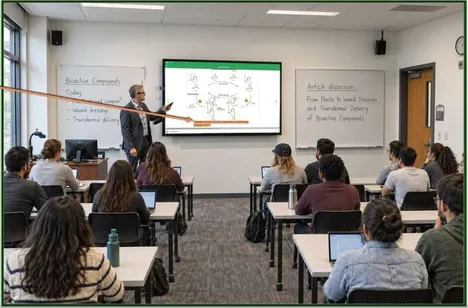
Instagram® speed navigation between related iReserves items is a surprisingly valuable feature of Course Mind Palaces. Once the instructor or student has selected a HotLinked highlight in a Mind Palace room, all other items in the room can be scrolled between instantly, both forward and backward.

Instructors that choose the best excerpts they can find may be able to compile a textbook exclusively from iReserves content and save their students the cost of a textbook. By avoiding using more than 10% of any one book, students can use KIC self-serve kiosks at their library to digitize an entire ‘iReserves textbook’ and study anywhere and also keep the content forever.
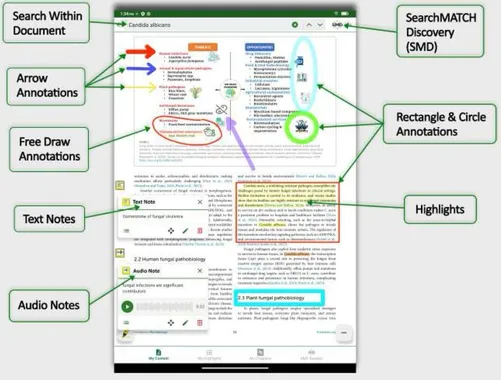
iReserves Includes Many Study AidsPDF Search, SearchMATCH, Annotations, Audio and Text Notes, Digital Highlighting
SKIM: computer-assisted speed-reading
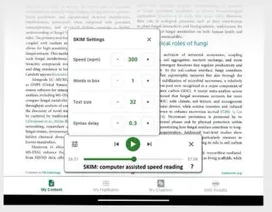
In addition to reducing eye strain, assisting visually challenged students and making quick pre-test reviews easier, SKIM makes it easy for students to follow the common study advice to skim over each study assignment before reading and studying thoroughly.
ReadAlong Audio
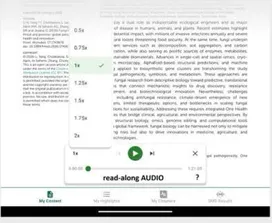
Audio is great for reducing eye strain and assisting visually challenged students. In addition, ReadAlong Audio can significantly increase retention.
Custom Flash Cards
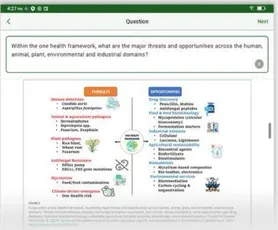
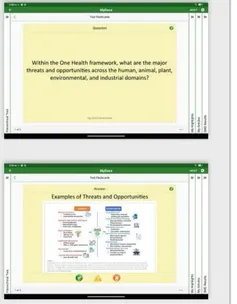
For many students, flashcards are an essential study aid. The flashcard system in iReserves allows students to simply select and copy text or pictures from the iReserves content and edit the content to make questions and answers. Text can also be added to images.
iReserves Example Step by Step
Example of a Student Using KIC to Copy and View Content Outside the Library and Keep It Forever
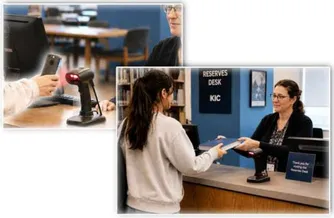
At the Reserves desk, the student presents a QR code of the item to the iReserves QR code reader and the iReserves desk app interprets the QR code and displays the iReserves book identifying information and the students ID for the reserves desk staff. A Reserves Desk worker locates the book on the Reserves shelves, brings it to the student and marks the item as having been transferred to the student.
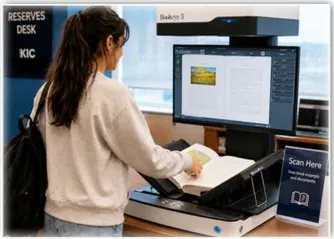
The student checks MyDocs for which chapters the instructor selected and digitizes each chapter, and sends them separately to their MyDocs system, and with one button press, connects each chapter to the chapter in their MyDocs iReserves record.
Note: The student, and all patrons, own forever what they digitize on KIC self-serve digitization systems, with one legal limitation that is displayed on all KIC Self-serve Digitization Systems: a reference to the copyright law that prohibits the digitization of more than 10% of a book or systematic digitization of the entire book, even if performed over many days, small excerpt at a time.
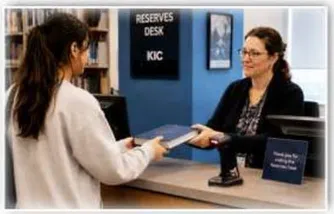
The student returns the book to the Reserves Desk where the Reserves staff marks it as returned.
Students own KIC-made copies of reserved chapters and can view them anywhere, at their leisure forever. For conservative adherence to copyright laws, whenever the student studies the content, the actual copy displayed by the MyDocs app is the copy the student created using a KIC Self-serve Digitization System at the library, and any highlights that the student may have made while studying the iReserves copy of the content in the library are automatically transferred to the KIC-made copy.

Better Course Materials at Lower Cost
iReserves Allows Your Library and Faculty to Provide Better Course Materials for Less Money
Students learn faster, Easier, and with Better Retention
It is an unfortunate fact that copyright limitations laws for books and scientific journals apply to the printed form of the items. Over 20 years, there have been many meetings and discussions about updating the law for the digital age, but never with the necessary consensus to change the laws. We can keep waiting and complaining while we hope for change someday, or we can better utilize the gifts the copyright law authors gave us – the copyright limitations laws. ILL and self-serve copying/digitizing are two copyright limitations laws that are regularly used in thousands of US libraries. DLSG should know – well over 90% of ILL and self-serve digitization is performed using BSCAN ILL and KIC Self-serve digitization systems. Both of these technologies are protected by copyright law Title 17 Section 108. Title 17 section 9 (First sale) explicitly states that libraries can lend print books. Public Display (also in section 9) and the official congressional notes on Public Display are included later in this brochure.
iReserves with KIC can restore reserves use without paywalls to pre-digital age levels while adding powerful content-enhancing technologies that help students derive maximum benefit from reserves materials. A full complement of digital study tools are integrated with Personal Digital Mind Palaces that organize course of content from multiple sources and support Instagram® speed Rapid Review from item to item. An AI-age relevancy-based SearchMATCH Discovery System (SMD) for reserves content that is not currently reserved can also find relevant ILL-digitized articles and Opus-digitized special collections.
| eReserves vs iReserves & Reserves + KIC | eReserves | iReserves with KIC |
|---|---|---|
| Content Subscription Fees (Paywalls) | YES | NO |
| Content Can be Kept Forever | ✕ | ✓1 |
| Digital Access Anywhere | ✓ | ✓1 |
| Digital Access in Library | ✓ | OPTIONAL - with iFence |
| Faculty-made Course Mind Palaces | ✕ | ✓ |
| Student-made Course Mind Palaces | ✕ | ✓ |
| Retention of Course Mind Palaces Forever | N/A | ✓1 |
| Highlighting that Persists (2) | N/A | ✓ |
| Audio Playback of Content and Highlights | ? | ✓ |
| SKIM – Computer-assisted Speed Reading | ? | ✓ |
| Custom Flashcards with Persistent (2) Connections to the Source Content | N/A | ✓ |
| 24/7 Study Coach with indicators showing what has been read with ReadAlong Audio and/or SKIM | ✕ | ✓ |
| SearchMATCH Discovery - AI Algorithms without conclusions, hallucinations, consensus seeking, ... | ✕ | ✓ |
| Can Incorporate Digitized Special Collections Content | ✕ | OPTIONAL4 |
| Can incorporate Digitized ILL Content | ✕ | OPTIONAL5 |
- (1) Only excerpts can be digitized and viewed anywhere, not entire books
- (2) Highlights that are made while in the library on iReserves content are retained and when the student returns to the library and the content is again visible, the highlights will also appear
- (3) Flashcards that are made from iReserves content while in the library are retained and when the student returns to the library and the content is again visible, flashcard source content can be recalled
- (4) Only print items that are sturdy enough to be considered for placement in Print Reserves and digitized with a V-cradle equipped KIC
- (5) Only for students that have ILL request privileges
From 1980 to 2020, higher education costs as a percentage of median family income have tripled, and with AI threatening massive job displacement, it is clear that education quality must rise while the costs stay in check. iReserves and KIC self-serve digitization systems in the library can help significantly.
iReserves with KIC is packed with powerful, copyright-legal content access, highlighting and annotation features that can raise the quality of education for a significant percentage of courses. Course Mind Palaces and Rapid Review amalgamate myriad pieces of study content from many print items into one highly vetted, instantly navigable digital course compendium with instant recall and Instagram® speed review. SearchMATCH Discovery uses AI algorithms, but leaves the conclusions to the students, thus avoiding the hallucinations and consensus seeking biases that AI experts are beginning to admit will NOT be eliminated by scaling up LLM-AI with more and more expensive hardware.
The Limitations of AI
LLM-AI is based on tokens and sequences. ‘World Model’ AI is based on space and time and is far more complex than LLM-AI, and consequently is likely decades away from revolutionizing higher education. When World Model AI matures, it will likely be limited to the physical and life sciences. Even World Model AI will not directly address the social sciences, political science, socio-economics, psychology, psychiatry, or philosophy, and using it to solve the quantum physics paradoxes may also be a dead-end.
Note that iReserves is based on the ‘Public Display’ copyright limitations laws and self-serve digitization is also protected by a copyright limitations law. Copyright Limitations Laws were added to copyright law so that they would be used as necessary to curtail overreach by copyright holders. Copyright laws defend big college textbook publishers’ pricing power. They should share the burden of overpriced education, and this is a perfect use for Copyright Limitations Laws and the technologies that enable them.
The following is an example of a faculty member teaching a course to 50 students per year with a $250 book.
Without iReserves, Students Could Pay $32,500 Over Five Years
During the first year, 50 students will each pay $250, for a total of $12,500. During subsequent years, used books and rentals will lower the collective cost for the students, perhaps to $5,000. After five years, 250 students will have paid $32,500 or an average Of $130 each.
With iReserves and KICs, Students will occasionally Pay $0
If a faculty member is able to find excerpts from ten to twenty or more books that together are significantly superior to the current course textbook, the excerpts can completely replace the current course textbook.
- The faculty member sends a request to the library to put the copyright-controlled excerpts on reserve and simultaneously makes ILL requests for each of the excerpts.
- The faculty member uses the content from the fulfilled ILL requests to create one or more Course Mind Palaces, building a well-organized compendium with highlights and annotations, and shares it with the class via email or the learning management system.
- The students are able to view open access content immediately and can use the [ Get with KIC ] feature and visit the reserves desk at the library and digitize any excerpts they want or need, and those excerpts will be viewable along with the highlights and annotations.
- During instruction, the faculty member can display the Course Mind Palaces and excerpts on-screen and the students can follow along by bringing up the same Course Mind Palaces and excerpts on their tablet or notebook computer. The students can add their own highlights and annotations in class and while studying.
With the Addition of an iFence
An iFence gives students digital access to all the excerpts while in the library, without needing to use a KIC to digitize the content. iFences ensure that the Public Display copyright law is complied with. For example, if the library has reserved two copies of a particular item, only two students can simultaneously view the item.
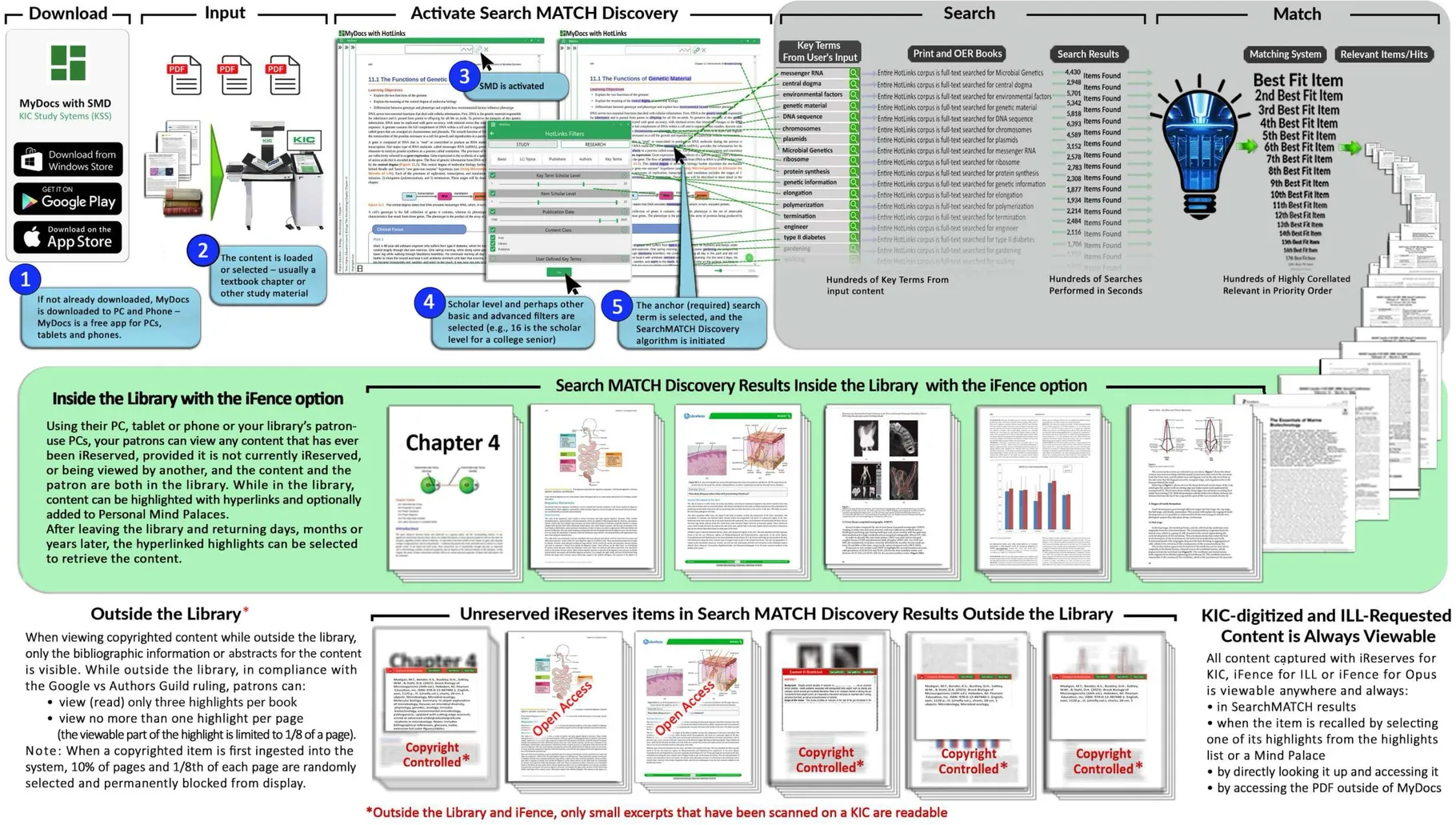
SearchMATCH Discovery for iReserves
SearchMATCH Discovery for iReservesFinally, full-text search for popular print collections items
Students benefit from your print collections when they can find content that is relevant to what they are studying. SearchMATCH Discovery takes study material as input, SearchMATCHes all content that your library has ever added to the iReserves iFence and is currently not reserved, as well as all other iFence content, and instantly displays the
relevant items, provided the student and the print version of the content are both in the library and inside an iFence. Access to additional relevant materials can help students better understand their assigned textbooks, and is great for students that want the best education they can get.
iReserves for Print Journal Articles
Print Journal Articles can be Placed on iReserves and Searched Using DLSG's
SearchMATCH Discovery - a Fundamental Reinvention of Discovery
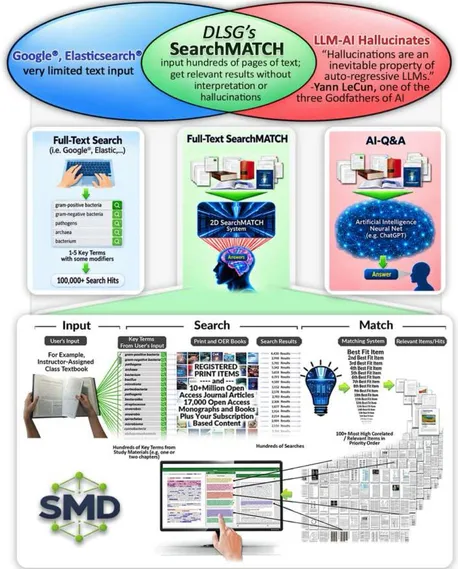
Discovery is the whole process of finding, filtering, and reviewing journal articles and other forms of research. To find articles, researchers can perform relevancy-based SearchMATCH and full-text search and review citation networks, subject feeds, smart recommendations, alert (notifications) and article abstract search services. Quick filtering for likely value is done by favoring certain publishers or authors, or by reading titles and abstracts. More thorough filtering is done by scanning the content for potentially important elements and more carefully reviewing those elements.
While journal articles have traditionally been mostly for scientists and PhD students, and a little for Masters students, times are changing. Millions of Journal articles are now being published each year and articles are becoming important even for many undergraduate students. DLSG’s Article Discovery Tools include SearchMATCH Discovery, Rapid Review, Shareable Personal Mind Palaces, Research Hunt, and Copyright Limitations Technologies in Libraries (e.g., ILL, self-serve digitization, Public Display).
Article discovery is painfully slow – For example scientific researchers typically spend 200 hours per year and admit they should spend twice that, but the process is tedious and inefficient:
- For decades, article discovery relied on searches of abstract databases, which are known to be woefully inadequate.
- When relevant articles were found, they had to be downloaded to be viewed.
- Third-party software has helped remove inefficiencies from review, but much more improvement is needed.
The result has been to substantially slow global scientific advancement. DLSG's objective is to eliminate much of the tedium and improve efficiency and effectiveness so substantially that scientists can get 400 hours of literature discovery done in 200 hours.
Students and researchers need a discovery system that:
- lets them input many pages of content and find the most relevant items from a vast repository of copyright-controlled and open access content.
- finds the most relevant items, not just the items that contain a few search terms
- allows them to review the results at Instagram® speeds
- highlight interesting points and info
- save the highlights and use them later to instantly recall the sources
DLSG's SearchMATCH Discovery is a whole generation beyond simple full-text search of massive amounts of content - its results are relevancy-based, without the hallucinations that plague LLM-AI - SearchMATCH does not draw conclusions. SearchMATCH can take hundreds of pages of content as input and simultaneously search on massive amounts of copyright-controlled library print content and open access content. The SMD repositories include 20% of all scientific journal articles ever published.
PhD students often maintain personal journal article collections. Scientist’ collections typically include anywhere from 200 to 2,000 articles that they frequently or occasionally reference. Because they have so many articles that are relevant to their current research, when scientists want to reference a particular piece of research, they often have trouble remembering which article the research is in. Sometimes they can’t remember which article the specific piece of research is in, and sometimes they simply can’t remember the name of the article.
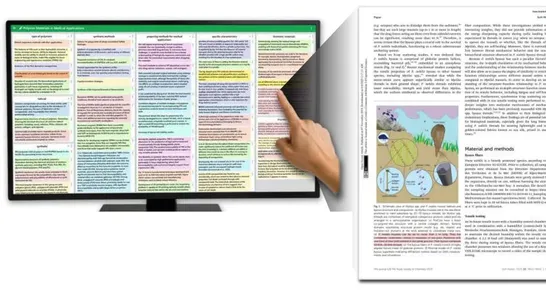
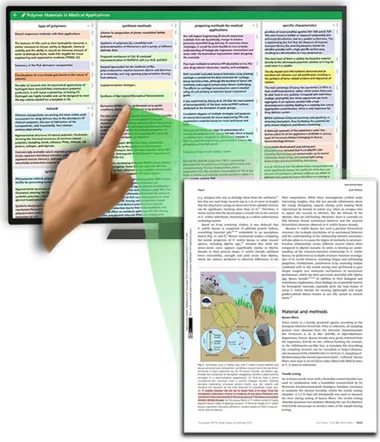
DLSG’s Personal Digital Mind Palaces allow users to create multiple Mind Palaces, each on a specific topic, and in each Mind Palace they can create multiple rooms, each on a specific subtopic, and in each room, they can place snippets from each book chapter or article of interest.
Article snippets are chosen to capture the essence of the content from the perspective of the user that made the snippets. To reread a particular piece of content, the user needs only to click to open the Mind Palace, find a snippet and click to select it.
Mind Palaces are particularly effective because they utilize the human brain’s well-developed loci ‘circuitry’ to find content by the locations of their snippets in well-organized Digital Mind Palaces.
Mind Palaces can also be shared with classmates by email. Open access content is instantly viewable, while copyright-restricted content must first be digitized by a KIC system at the library, and sent to MyDocs, whereupon it becomes viewable.
Artificial Intelligence Has Its Place in Research, but…
Artificial Intelligence has found its place in scientific research as an ‘extra member’ of research teams, one that must always be scrutinized. Large Language Model AI (LLM-AI) does not create new ideas – LLM-AI systems cost billions of dollars because they hold unimaginably massive amounts of human-written text in AI accelerator hardware that enables near instant retrieval of the most relevant human-written text, which is why LLM-AI can’t discern a good answer from a bad one, and instead, finds recurring answers. Yann LeCun, the former AI Scientist at Meta®/Facebook® states emphatically that LLM-AI cannot be scaled up and up to eliminate hallucinations. Overuse of LLM-AI can be catastrophic:
- LLM-AI does not ‘understand’ science – its consensus-seeking nature plagues it with blind spots and will only suppress essential discoveries.
- While it can find potential candidates to fill gaps in human knowledge, LLM-AI can’t actually determine what could actually work (e.g., what complies with the laws of physics).
- AI systems can be manipulated by their owners to influence the directions scientific research takes.
- Because LLM-AI is so fast and easy to use, a big risk exists that most scientists will gravitate toward depending on it too much, in spite of all the warnings.
Note: Unlike LLM-AI, World Models AI is time-space aware, but is still in early development.
iFence option for iReserves
Even without iReserves, Print Reserves together with KICs are a great value. Some of the most heavily used KIC systems are at top US universities in Reserves Rooms and near Reserves Desks – these universities understand the value of allowing students to make PDFs of carefully selected book excerpts for free and keep them forever.
However, iReserves offers substantial improvements over traditional Print Reserves and great savings over eReserves:
- Your students enjoy Instagram® speed chapter-to-chapter and book-to-book study and review.
- Your faculty can easily make Course Mind Palaces with iReserves content HotLinks (hyper-linked highlights) and distribute the Mind Palaces to your students (e.g., using Canvas® or by email).
- Your students can easily make additional HotLinks in iReserves content, add the HotLinks to Course Mind Palaces and/or their own Personal Mind Palaces, and instantly recall the content.
- iReserves have NO PAYWALLs for your institution or your students (), none of the often substantial fees that publishers charge for items placed on eReserves.
And with the optional iFence:
- Your students can read, highlight and annotate the iReserves content digitally in the library using their own PCs, tablets and phones, or MyDocs-enabled patron-use PCs ( one image of the content can be concurrently displayed in the library per library-owned book that is in the library.)
- While viewing iReserves content in the library, your students can select any iReserves content they are viewing for digitization on a KIC system, visit the Reserves Desk or Room, get the print item, make PDFs of the content, and study the content outside the library, and keep the KIC-made PDFs forever (). Existing HotLinks are automatically linked to the KIC-made PDFs.
Note: The larger the number of items an instructor puts on iReserves, the larger the number of his/her students that can simultaneously study the iReserves materials while in the library in an iFence.
 While in the Library, All Copyrighted
Print Collections Content is Readable
 When Outside the Library, Copyright-controlled
Content is Blurred, While Metadata is Readable
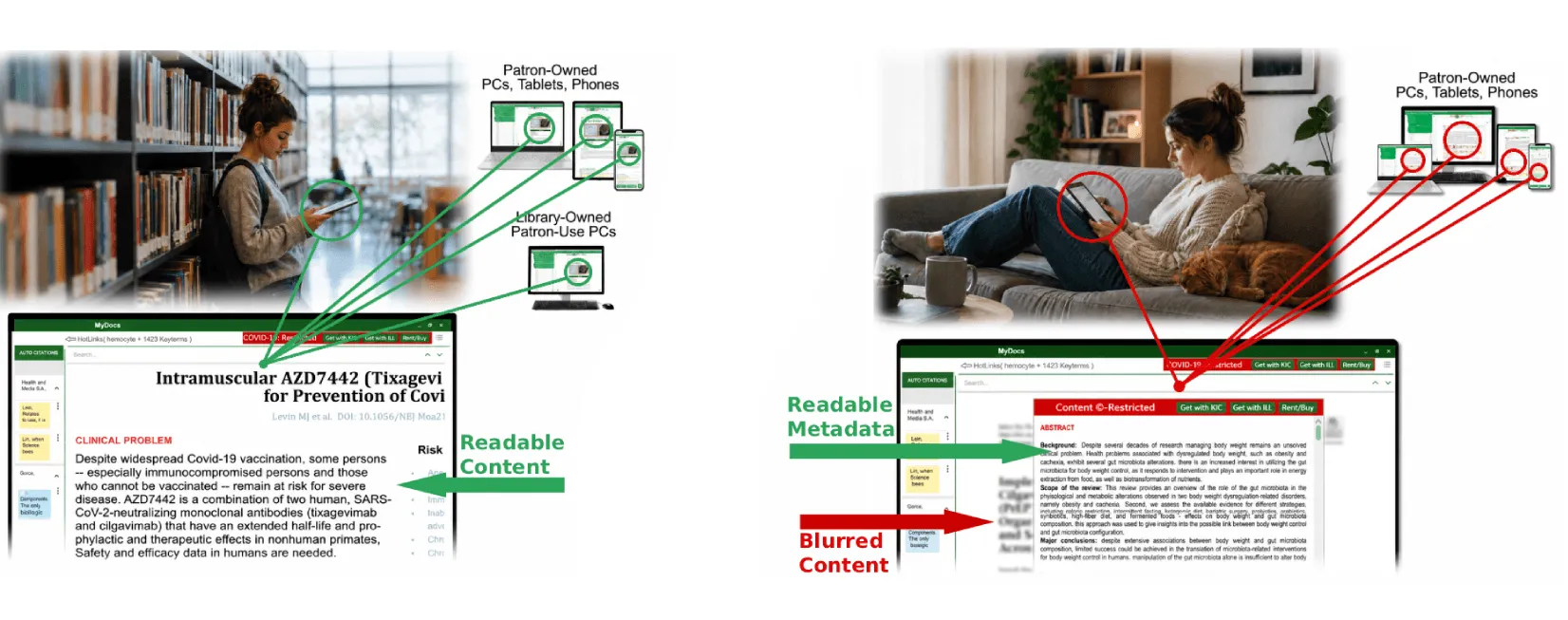
Example of a Student in the Library in an iFence Viewing iReserves Content Digitally
Instructors send emails to iReserves@<university-library>.edu with freeform requests for specific books and chapters to be added to iReserves for their courses along with the duration of the reservation. The Reserves Desk worker locates and retrieves the books from the library print collections, creates a Course-Instructor iReserves record and adds the book chapters to the record. If any of the requested chapters haven’t already been digitized, they are digitized. Note: all iReserves items that are not currently reserved are full-text searchable by all patrons, a requirement for copyright law compliance (see Google vs Authors Guild). Either an email requestor or a professor can submit three of his own books to the reserves desk for a particular class.
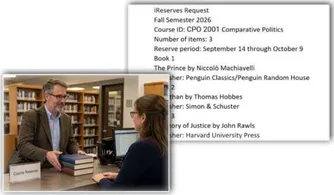
Students receive QR codes from their instructors that enable them to access iReserves content digitally while they are in the library.
After a student in the library finishes studying an iReserves item on their own notebook PC, tablet or phone they stop studying the item and release it for other students to study
Note that instructors can specify a time limit per student.
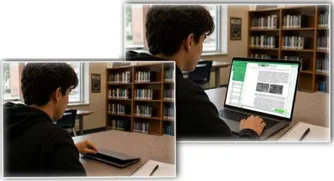
Other students waiting for the item are likely busy studying other materials. When the item becomes available, the first of these students to request the item receives a message on their phone, tablet or PC that pops onto their screen and informs them that the item is now available. That person has a limited amount of time (configurable by library administrators) to request the content, or it will be offered to the next in line. Once accepted, the content again becomes unavailable for a time that cannot exceed the amount of time specified by the instructor.
After opening the iReserves item and studying it for a little while, the student decides to put the item on their KIC Scan List to get a personal copy of the content by digitizing it on a KIC self-serve digitization system.